
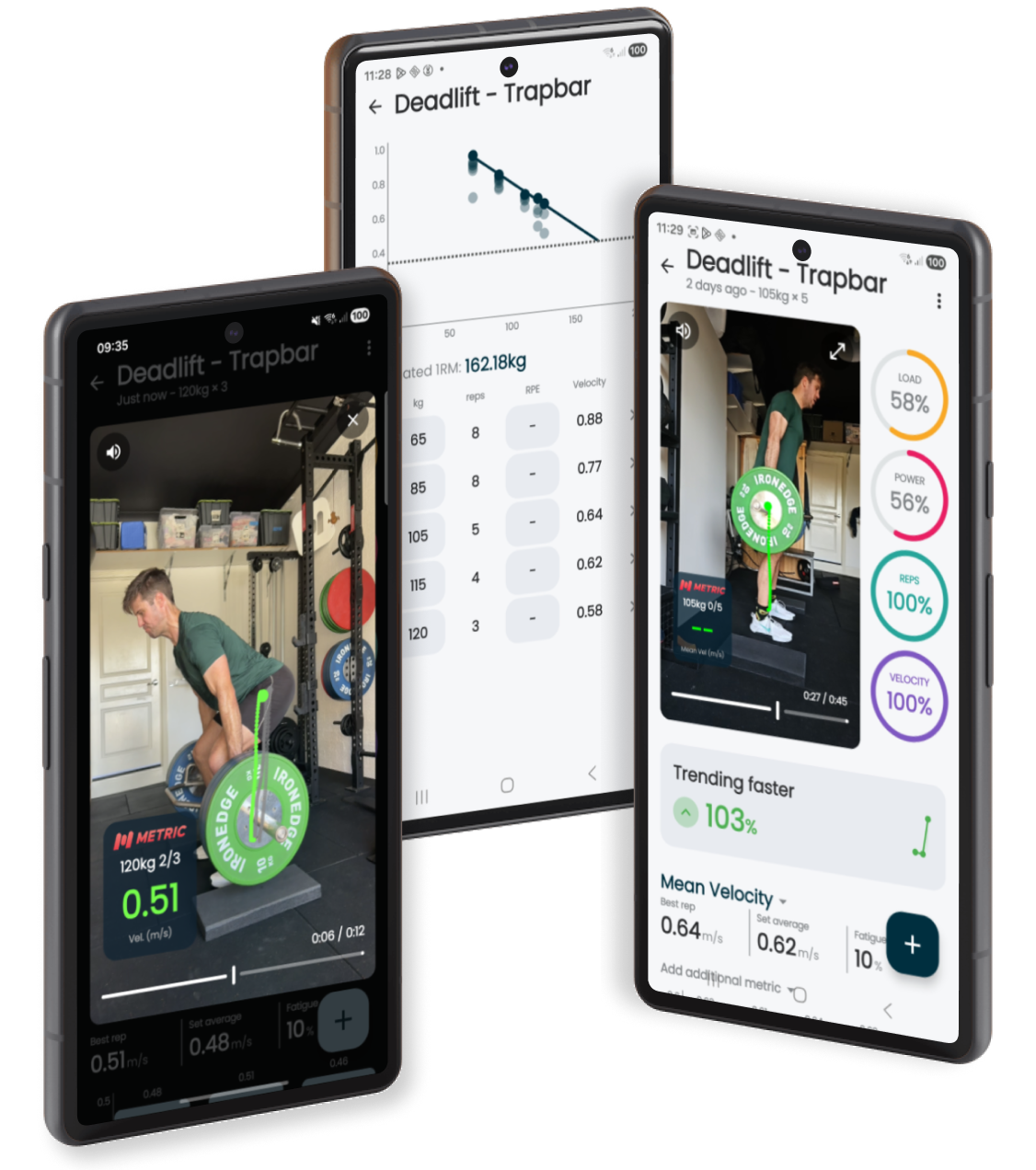
It's here. Finally!
If you've been following Metric for a while, and don't own an iPhone there is a good chance you've probably sent us a variation of "when is Android coming?" at some point over the past three years. Today, I can finally start answering with "it's up, here's the link:"
Metric VBT is now available on Android in public beta →
This post is the full story of our Android development path — why we went iOS first, why it took so long, the problems we ran into, where the app is today, and where it's heading.
Some of this post is technical, but should give you some inside baseball view of the iOS-Android development world. We will keep things honest and transparent (in ways that might surprise you), and share the truth about what it takes to bring a computer vision system to the Android platform with over 30,000 different device models.
Why Android Took Five Years
We launched the Metric iOS beta in November 2021, after starting with a concept during COVID lockdowns in early 2020, it took us the best part of 18 months from concept to an app that was beta ready (turns out we weren't but that's another story).
We are a small bootstrapped team. We are coaches, sports scientists and developers. So for a long time we deliberated chose to focus on making iOS amazing. Improving tracking accuracy, adding workout tracking features, supporting real-time feedback and coach-athlete features like template sharing and leaderboards kept us busy for a long time!
Better to build one awesome, useful app (that generates revenue and allows the business to continue) than to stretch ourselves into another platform and app.
Metric is a little more complicated than your typical app. Metric turns the camera on your phone into a barbell tracking device without the need for an external sensor. Metric handles the entire pipeline from recording HD video, detecting and tracking the barbell in the video frame, calculating velocity, bar path, range of motion, and tempo in real-time then providing meaningful insights to improve your training quality.
Some portions of this are super easy, but the very heart of Metric – our patented computer vision tracking system – is a little more involved.
On iOS, our vision system is written in C++ and uses Metal shaders — Apple's low-level graphics API — to offload the heavy computational work to the GPU. Metal is what lets Metric keep pace with live video without your phone melting. Even after Metric was publicly available on The App Store, it took years of refinement to continually optimise this code, to run fast enough to support real time feedback, improve precision and reduce motion blur for a useable bar path trace, and handle as many edge cases as we could.
Android doesn't support Metal code. It has Vulkan, a completely different graphics API with its own architecture, its own computer vision language, and its own way of managing memory and compute pipelines. The algorithms and concepts are the same, but the implementation had to be rewritten from scratch.
So by late 2024, the iOS vision system was mature, fast, and reliable and we started exploring an Android app project.
We knew that a Vulkan rewrite would have its challenges and quirks, but we didn't expect it to be THIS hard…
The 60fps Problem
Just like iPhones, the vast majority of Android phones are fully capable of recording high resolution video (1080p or 4k) at 60fps (frames per second).
However, unlike developing for iOS, not all phone manufacturers give third-party developers (that's us) the ability to use the full power of the camera by applying a software restriction. The logic is that by throttling the higher performant camera features poorly built apps won't overheat the device and cause crashes, a legitimate concern on budget devices with limited RAM and less powerful GPUs.
Samsung was the most surprising example to throttle all their devices. Every Samsung, including their flagship Galaxy S and S Ultra series, all record beautiful 60fps video in Samsung's own camera app. When the Metric code asks for access to the camera and requests available settings (lens values, zoom, focus, frame rate etc) the device returns a limit of 30fps as the maximum frame rate we can use.
From what we can tell so far, this limit affects all Android manufactures with the only exception being Google Pixel. Pixel's runs a minimal, "standard" version of Android, and Google gives third-party apps full access to the camera's capabilities.
Why does frame rate matter?
To accurately measure velocity Metric needs to see how far the bar moves between frames, and critically see the exact moment the bar starts and stops moving for each rep.
At 60fps, the camera captures a frame every 16.667 milliseconds. At 30fps, the gap between frames doubles to 33.33ms. For the bulk of strength training — squats, presses, deadlifts, RDLs, anything above ~60% of your 1RM — 30fps and 60fps return effectively the same numbers. Where the gap opens up is fast, dynamic work: max-power cleans, snatches, jumps, or fast-turnaround sets where the bar reverses inside a single frame. In those cases 30fps gives you valid data with slightly more noise around the peak; 60fps tightens it up.
How much the bar travels between consecutive frames at each velocity, expressed as a percentage of a 450mm plate diameter (the reference object Metric tracks):
- 0.3 m/s — 5 mm gap at 60fps, 10 mm at 30fps (~1% of plate)
- 0.6 m/s — 10 mm gap at 60fps, 20 mm at 30fps (~2% of plate)
- 0.9 m/s — 15 mm gap at 60fps, 30 mm at 30fps (~3% of plate)
- 1.2 m/s — 20 mm gap at 60fps, 40 mm at 30fps (~4% of plate)
- 1.5 m/s — 25 mm gap at 60fps, 50 mm at 30fps (~6% of plate)
Fixes and solutions
What this means for you in practice:
- Pixel: you're on 60fps automatically — nothing to do.
- Everyone else (Samsung, OnePlus, Xiaomi, etc.): Metric runs at 30fps in-app and compensates with the phone's IMU + lighting + focal-length data. Tracking holds up across the strength-training range.
- Importing videos: set your camera app to 60fps before recording — imported video bypasses Metric's sensor compensation, so frame rate matters more.
There's more to accurate barbell tracking than just frame rate. Metric isn't just a camera app — it uses the device's accelerometer and gyroscope for angle and tilt, reads image signals like lighting and focal-length metadata, and pulls a number of camera-control levers specifically tuned for object tracking and computer vision rather than for pretty video. That's why an in-app 30fps recording often beats an imported 60fps clip.
There are rumours that Samsung will be opening up 60fps to third-party developers with the S26 but nothing is confirmed — keep an eye on the Android release notes for any updates.
The Fragmentation Problem
The second big problem, and the #1 reason for why we picked iOS over Android as our starting platform for Metric is variety. Specifically device, chipset and software variations within the Android ecosystem.
Every iPhone (and even iPad for that matter) that supports Metric behaves effectively the same way. The camera APIs are the same, video pipelines are standardised, and how we expect the GPU to read our code is consistent. Apple controls the hardware and the software, and save for the occasional hiccup when the new iOS version introduces something, that uniformity makes for a happy developer.
Android is the opposite. While dozens of manufactures and thousands of device options is great for giving consumers choice, this range of different chipsets, GPU architectures, camera sensors, and manufacturer flavours layered on top of the base Android operating system makes building a cohesive and consistent app a much bigger task. What looks right or works perfectly on a Pixel might behave subtly different on a Samsung, and crash entirely on a Xiaomi or OnePlus.
You can see this play out in our own install base. iOS sits in tight blue families across iPhone generations — a single hardware vendor, a small set of chipsets per era. Android sprawls across nine actively-used brands, with Samsung dominant but more than a quarter of installs split across seven other manufacturers, each shipping their own chip and driver combinations.
One frustrating example was the green line of death on the Google Pixel 10 series. These devices got a new GPU class from the Pixel 9 switching from Mali to a PowerVR class chip. There was a known bug that shipped with these devices where video image encoding was handled incorrectly, producing format errors in video files, giving the videos a color shift in the playback and a thick green line down the side of the frame.
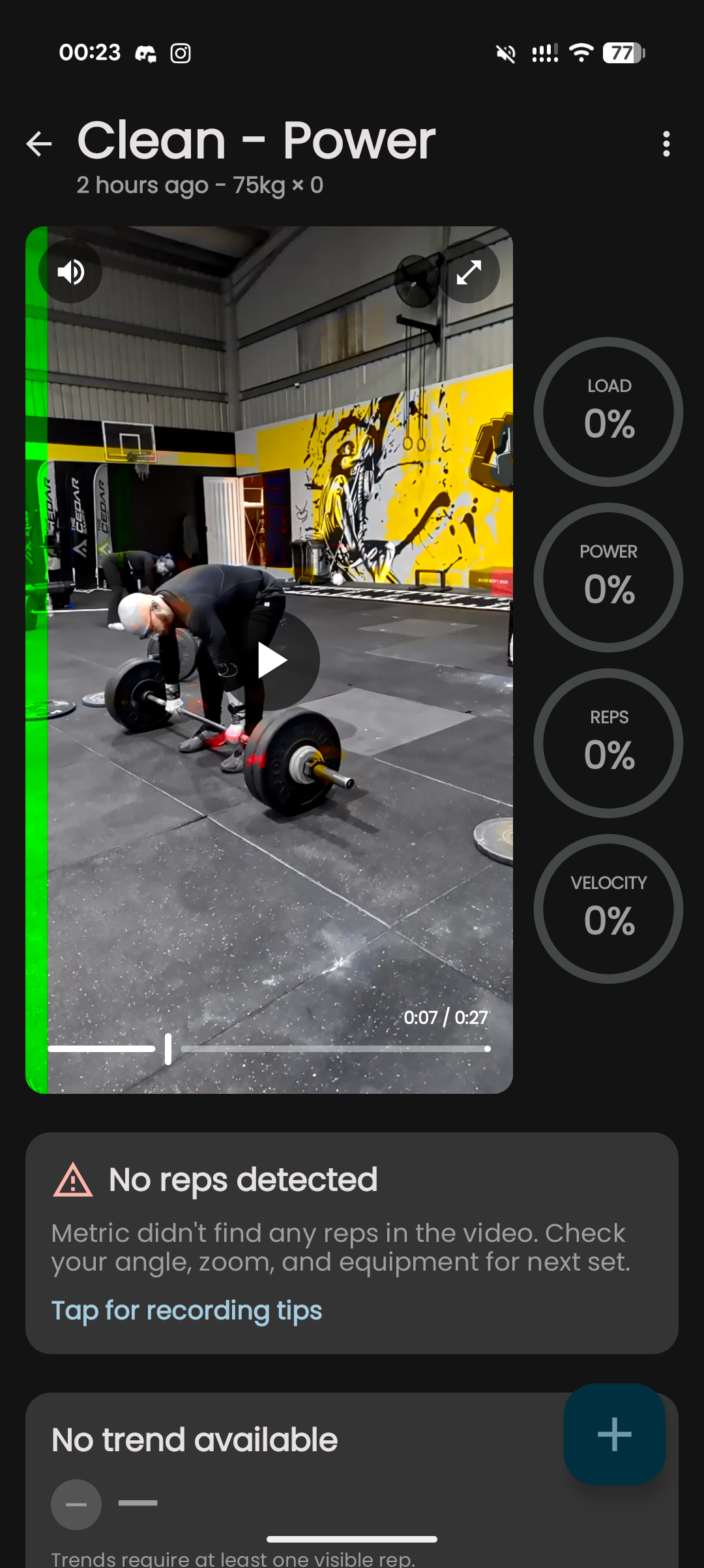
A switch to a different Android camera API and a full rewrite of our custom camera controls and video capture tuning later and the green bar is now gone and Pixel 10 produces great looking videos again.
But the worst one — the one that persisted through the entire public beta — deserves its own section.
The Bug That Almost Broke Us
For the technically curious, here's what it actually looks like when Android fragmentation bites.
Throughout the beta, every device running a Qualcomm Adreno GPU — which includes most Samsung Galaxy phones, plus devices from Xiaomi, Oppo, and others — produced zero detected reps. Not inaccurate reps. Not noisy data. Zero. Complete failure. You could film the cleanest squat in the world and the app would return nothing.
Meanwhile, the exact same build, the exact same code, running on Google Pixels (Mali GPU), Samsung Galaxy S24 FE (Xclipse GPU), and many other devices delivered perfect tracking. Great rep detections, clean bar path, and accurate velocity.
We knew the problem was GPU-specific. We just couldn't find it.
Two weeks of dead ends
We tried everything we could think of. We forced high-precision math in the shaders in case the GPU was rounding values to zero. We changed the image storage formats. We overrode the colour space conversions. We tested whether the bug appeared in the live camera path, the video import path, or both.
Then we built a standalone test app — a stripped-down computer vision program that replicated every step of our pipeline. We built it one piece at a time, testing at every stage to see if that single step failed on the Adreno device or produced wrong values. We ran 29 progressively more production-faithful isolated and integrated tests. Every single one passed on all devices, so maybe the problem wasn't in our code after all so we posted to Qualcomm and Samsung developer forums.
The bug refused to reproduce outside of the full app. For two weeks, we were chasing a problem that only existed in production and vanished the moment we tried to isolate it.
The diagnostic that cracked it
We eventually wrote a tracer shader — a diagnostic tool that, instead of processing the image, writes each GPU thread's identity into the pixel data. Effectively asking the GPU: "tell me who you are and where you're working on the chip."
When we read the output back, the pattern was immediately wrong. The GPU was only processing the first 5% of the pixels for a 1080p video. Everything below that first 5% was returning empty black pixels. That's why downstream tracking found no weight plates and no reps, the vision system was only running on a tiny cropped sample of the video and nothing else.
But why the exact same kill point in pixel processing?
Our shader tests declare a specific sized workgroup, and each of these workgroups processes a pixel tile of a fixed size. To cover a 1080-pixel-tall image, the system dispatches enough workgroups until it covers the video frames full resolution. The tests showed that enough workgroups were being dispatched — but each one was processing only a single row of pixels instead of their full allotment of pixels.
One line
Our build script compiled shaders with a version of Vulkan that encoded processing workgroup dimensions using a feature called LocalSizeId. On Mali, PowerVR, and Xclipse GPUs, the drivers gracefully handled the newer bytecode and read the workgroup size correctly. On Adreno, the rules are tighter and the Vulkan driver didn't recognise LocalSizeId. It silently defaulted to = 1.
No error. No warning. Just quiet, catastrophic failure.
The ultimate fix ended up one line in our build script.
That's it. One compiler flag. After recompiling, the full video was processed and I saw the sweetest bar path and velocity data I have ever seen in the Metric app.
Why this matters
There wasn't anything fundamentally wrong with our code, it didn't crash or overheat the device and we didn't actually change any logic in how the code is written. There was a toolchain mismatch between what the compiler was emitting and how one family of GPU drivers silently misinterpreted that information. Turns out it's somewhat of a known problem with these chips.
The reason our standalone reproducer never triggered the bug? Its compile script happened to use a different target flag than production. Same source code, different compiler settings, different bytecode, different driver behaviour. We only found it by buying a fourth test device, writing custom diagnostic shaders, and reading GPU thread IDs out of pixel data.
Thanks so much to our Adreno GPU beta testers who lived with this bug for weeks, patiently sending in reports, providing details and sample videos while we tracked down the issue.
Supported Devices
The result of all this work is a constrained supported device list. Metric is a high-performance app, with code that speaks directly to your GPU in order to run it's on-device computer vision system quickly and efficiently. Some devices simply are not up to the task and do not support the drivers and systems Metric runs to deliver accurate results.
With the help of our beta testers we have a wide range of tested devices and have a strong sense for the requirements of Android devices in order to run Metric well.
We don't love that we have to constrain the supported devices like this, but older devices and specific chipset configurations simply do not have the power to run the Metric tracking system.
A Small Team, a Big Build
We're coaches and lifters building an app we use in our own gym every day. As a small indie development team, we can stay agile in our work and ship features that serve users and make Metric a better training tool instead of just chasing growth hacks.
This flexibility and speed is not without its trade-offs: we are able to ship features fast, but also have to stay focused and stay disciplined in what we choose to work on. The patience from our Android community over the past few years hasn't gone unnoticed. We would get an almost daily message asking "when Android?" and this served as a constant reminder that people were waiting and people were eager to try the app.
What's in the Metric Android Beta
As of May 2026, the Metric Android app is in public beta (nearing our 1,000th download!)
This is a focused first release. We deliberately kept the feature set tight so we could ship, gather real feedback, and iterate quickly.
Available now
- Account creation and sign-in — syncs with your existing Metric account if you have one
- Record sets directly in-app or import videos from your camera roll
- 13 rep-level metrics velocity, ROM, bar path, and tempo data — the same core metrics as iOS and customisable per exercise
- Video playback with bar path overlay and rep by rep stats
- Load-velocity profiling with multi set workouts
- e1RM estimation and auto-warmup set generator
- Real-time audible feedback
- Video storage and export with data overlay (in-app storage)
- Performance charts and progress trends
- Searchable training history on your home screen
- Personal record badges for load, power, reps, and velocity
- Readiness trends flagging your velocity performance today vs your 6-week average
- Join a team if your coach has a Metric account they can invite you to join their roster
Coming soon
- Workout builder and session mode
- Coach mode and athlete management features
Now that the Adreno GPU problem has been solved, our current priority is making the tracking as accurate and fast as possible, this is improving rapidly as we lean on the lessons from the early days of iOS and learn more about what we can control in the Android camera coding libraries. In parallel we hope these features listed above will ship rapidly now that the vision system is approaching maturity.
The vision system port and tracking infrastructure was always going to be the first and hardest job in the Android build. Now it's on to the fun stuff!
Download the Beta
Ready to try Metric on Android?
Download Metric for Android on Google Play →
You'll need Android 14 or later for the best experience, and we recommend checking our supported device list to see if your device and Android OS version is on the list before downloading.
Found a bug? Have feedback? Join us on the Metric Discord — we have a dedicated Android beta channel where you can report issues, request features, and chat directly with me, co-founder and head of product at Metric (I'm also deep in the Android development work right now).
